
How to Find an Overview of Your Payouts
Want to check whether a payout has been processed or review your previous withdrawals? You can easily find a complete history of all payouts directly in your ViaBTC account.
Simply go to your watch link in ViaBTC and navigate to:
Assets → History → Withdrawal Records
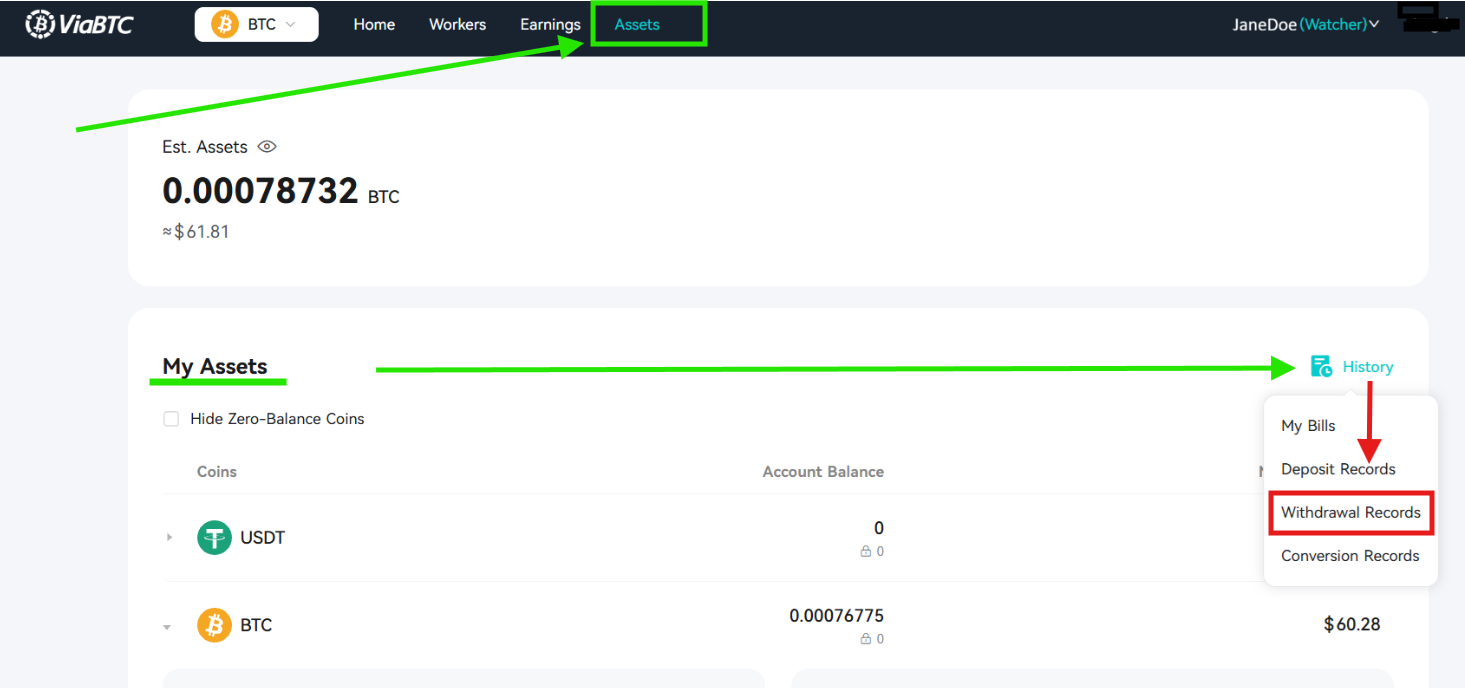
Here you'll find an overview of every payout, including:
- The payout amount
- The destination wallet address
- The date and time the payout was processed
- The Transaction ID (TXID), which can be used to track the payment on the blockchain
If a payout shows as Completed, it means the Bitcoin has successfully left the mining pool and has been broadcast to the Bitcoin network. If you haven't received the funds in your wallet yet, it's usually because the transaction is still waiting for enough blockchain confirmations or your wallet provider hasn't credited it yet.
If you cannot find the payout in your Withdrawal Records, first check that your payout threshold has been reached and that there are no outstanding invoices preventing payouts.
If everything looks correct but you still believe a payout is missing, please contact Epic Mining Support. To help us investigate quickly, include your machine ID (or account number) and, if available, a screenshot of your Withdrawal Records.